Onboarding project | Sprouts.ai - Sprouts.ai | GrowthX
Onboarding project | Sprouts.ai
đź“„

Onboarding project | Sprouts.ai

SproutsAI Onboarding & Activation Strategy

SproutsAI is a B2B platform designed to help SDRs and marketers identify their Ideal Customer Profile (ICP), build Target Account Lists (TALs), and launch campaigns – all via a conversational AI assistant. With advanced filters, verified B2B contact data, and AI-generated workflows, SproutsAI simplifies outreach while improving precision.


Goal: Reduce drop-offs, increase onboarding success, and accelerate product-led growth.

Based on usage frequency, growth potential, and appetite to pay, we have defined 5 ICPs


Defining ICP for Sprouts


Criteria

ICP 1 – Startup Founder

ICP 2 – Outbound SDR

ICP 3 – Sales Manager (Mid-Market)

ICP 4 – B2B Marketing/Growth Manager

ICP 5 – Recruiting Professional

Company Size

1–10 employees

11–50 employees

100–500 employees

20–200 employees

5–100 employees

Location

Tier 1 startup cities

Global startup hubs

Global

Global

Tier 1/2 + remote

Funding Raised

Bootstrapped / Seed

Series A/B

Series C / Profitable

Seed to Series B

Bootstrapped / Seed

Industry Domain

Tech, Agencies

SaaS, Tech

Tech, Services

SaaS, Marketing Agencies

Staffing, HR

Stage of Company

Early-stage

Scaling outbound

Mature

Scaling demand generation

Expanding hiring capacity

Org Structure

Solo seller or small founder-led team

Small SDR team, reports to Sales Lead

Team of SDRs/BDRs, reports to Head of Sales or RevOps

Sales-aligned marketing team

Recruiter or small hiring team

Decision Maker

Founder

SDR (free); Manager (paid)

Sales Manager / RevOps

Marketing Manager (with sales approval)

Recruiter / HR Lead

Decision Blocker

Cost

Manager buy-in / budget

Procurement, IT, switch costs

Budget prioritization between sales vs marketing

Lack of recruiting-specific features

Frequency of Use

Occasional bursts

Daily

Weekly (monitoring); Team = daily

Periodic (campaign-based)

Daily when hiring

Tools Used

Spreadsheets, LinkedIn, Free CRM

CRM, SalesNav, Outreach tools

ZoomInfo, CRM, SalesNav

CRM, HubSpot, Marketo

LinkedIn Recruiter, ATS

Org Goals

Land first customers, survive runway

Book meetings, hit quota

Hit pipeline/revenue targets at scale

Fill top of funnel, generate MQLs

Fill roles fast, reduce time-to-hire

Preferred Outreach Channels

Email, LinkedIn

Email, LinkedIn

Email, CRM-integrated workflows

Email marketing, ABM tools

Email (preferred), LinkedIn backup

Conversion Time

>2–3 months (after proving ROI)

2–4 weeks after success with leads

1–3 months trial for pilot group

1–2 months if campaign ROI is visible

1–3 months after successful placements

GMV Impact

Early revenue, initial growth

Meetings → Pipeline → Revenue

Multi-seat expansion, high ROI

MQLs → Sales enablement → Revenue

Time-to-hire & placement success

Growth of Company

Unpredictable

Consistent growth

Steady, larger contracts

Adds 1–2 seats if successful

High TAM but slow expansion per company

Motivation

Survival, first deals

Commissions, targets

ROI & efficiency

Funnel performance

Faster hires, success rates

Org Influence

Low–Medium (solo use)

High (virality in sales teams)

High (central to sales tooling decisions)

Medium (supports but not leads tooling)

Medium (referrals within HR communities)

Tools Utilized

Apollo Free, LinkedIn, spreadsheets

Sales stack (CRM, email, Chrome Ext)

Enterprise tools, data sync

Enrichment, email tools

Contact finders, email export

Decision Time

Long (cash-sensitive)

Fast (if proves value)

Slow–Medium (evaluation cycles)

Medium (pilot/test phase)

Medium (solo use → team tool later)


ICP Prioritization Framework


Criteria

ICP 1 – Founder

✅ ICP 2 – SDR

⚠️ ICP 3 – Sales Manager

❌ ICP 4 – Marketer

✅ ICP 5 – Recruiter

Adoption Rate

âś… High

âś… High

⚠️ Medium

❌ Low–Medium

âś… High

Appetite to Pay

❌ Low

⚠️ Medium

âś… High

⚠️ Medium

❌ Low–Medium

Frequency of Use

⚠️ Medium

âś… High

⚠️ Medium (team = high)

❌ Low–Medium

✅ Medium–High

Distribution Potential

⚠️ Medium

âś… High

⚠️ Medium

❌ Low

⚠️ Medium

TAM (Market Size)

âś… High

âś… High

⚠️ Medium

⚠️ Medium

âś… High


Recommended Focus Segments for SproutsAI

ICP 2 – Outbound SDR

• High daily usage

• Fast feedback loop

• Virality (sales teams, job hoppers)

• High expansion potential (multi-seat)


ICP 5 – Recruiter

• Fast-growing new persona

• High TAM globally

• Strong product-market fit emerging

• Feature adaptations can unlock market (e.g., email enrichment for recruiting)


Both ICPs have volume, usage frequency, and market opportunity, making them high-leverage targets for SproutsAI's onboarding, product development, and growth strategy.


Goal Priority

Goal Type

ICP

JTBD (Job To Be Done)

Validation Approach

Validation Insight

Primary

Personal Goal

ICP 1 – Founder

When launching an outreach campaign, I want to find verified leads fast using one tool so I can close initial deals.

Onboarding analytics, early lead success rates, interviews with early-stage founders

“I closed my first 2 customers using Sprouts in a weekend — didn’t need to learn another tool.” Founders value simplicity and time to first meeting.

Secondary

Business Goal

ICP 1 – Founder

When I validate product-market fit, I want proof that Sprouts saves time and money so I can justify sticking with it.

Monitor TTA (Time to Activate), ROI post-conversion, churn analysis

“I needed traction to raise — Sprouts helped me email 100 leads quickly. Now I recommend it to other founders.”

Primary

User Goal

ICP 2 – SDR

When prospecting daily, I want to search, find contacts, and send outreach — all in one flow — so I can hit my quota.

Funnel tracking: first lead + sequence sent; sequence success rate; retention cohorts

“I save 30–60 minutes per day. I built my cadence directly inside Sprouts — no need for multiple tabs or tools.”

Secondary

Business Goal

ICP 2 – SDR

When running outbound, I want a high volume of quality leads so we can drive predictable pipeline for the business.

CRM pipeline attribution, team activation rate, interview with sales leads

“Every SDR on my team uses it daily — it’s our default tool for lead gen. We’ve shifted from ZoomInfo to Sprouts.”

Primary

Strategic Goal

ICP 3 – Manager

When evaluating new tools, I want to reduce ramp time and improve rep output so I can increase team quota attainment.

Pilot-to-purchase conversion time, productivity delta across team

“I saw 25% more outreach per rep within 2 weeks of switching. Ramp time dropped by half.”

Secondary

Financial Goal

ICP 3 – Manager

When reviewing tools, I need similar value to ZoomInfo at a lower cost so I can reallocate the budget elsewhere.

Cost-benefit analysis vs. existing tools, procurement feedback

“Sprouts gave us 80% of ZoomInfo at 30% of the price. That helped me make the case to procurement.”

Primary

Campaign Goal

ICP 4 – Marketer

When planning a campaign, I want to find the right contacts and export them so I can improve email targeting.

Export tracking, email match rates, MQL conversion attribution

“We ran a webinar campaign and pulled the entire prospect list via Sprouts. It doubled our email open rate vs previous lists.”

Secondary

Attribution Goal

ICP 4 – Marketer

When reviewing outcomes, I want to tie lead data back to pipeline impact so I can prove marketing’s value.

UTM-based lead source tracking, Salesforce attribution data

“The CMO finally noticed our outbound-generated pipeline. Sprouts helped us enrich leads fast enough to show up in CRM and dashboards.”

Primary

Sourcing Goal

ICP 5 – Recruiter

When sourcing candidates, I want verified personal emails so I can contact them directly and fill roles faster.

Contact export usage, reply rate comparisons (Sprouts vs. InMail), recruiter interviews

“I emailed 12 backend engineers — 6 responded in 3 days. That’s faster than I’ve ever seen on LinkedIn.”

Secondary

Hiring Outcome

ICP 5 – Recruiter

When hiring under pressure, I want a fresh candidate pool at low cost so my agency/company can close open roles faster.

Time-to-hire tracked across tools, agency placement rates

“I placed 3 candidates using Sprouts-sourced emails. I’m pushing my team to switch from LinkedIn-only workflows.”


Key highlights

Speed to value is universal – every ICP has urgency (founders = traction, SDRs = quota, recruiters = placements).

All-in-one workflow is a major win, as SDRs, founders, and recruiters value not switching tools.

Perceived ROI drives retention. Whether it’s replacing ZoomInfo or closing one deal/hire, users must feel the value.

Team influence matters SDRs and recruiters who find success bring in more teammates (expansion/virality levers).

Friction = drop-off – ICP 4 (marketers) show lower commitment due to unclear ownership of Sprouts (sales tool? marketing tool?).


Sprouts.ai Onboarding Teardown

For each step:

  • What is working and why
  • What is not working and why
  • Suggested changes (with reasons)
  • Where the "aha" moment occurs
  • Cognitive bias evaluation


1. Sign Up Screen
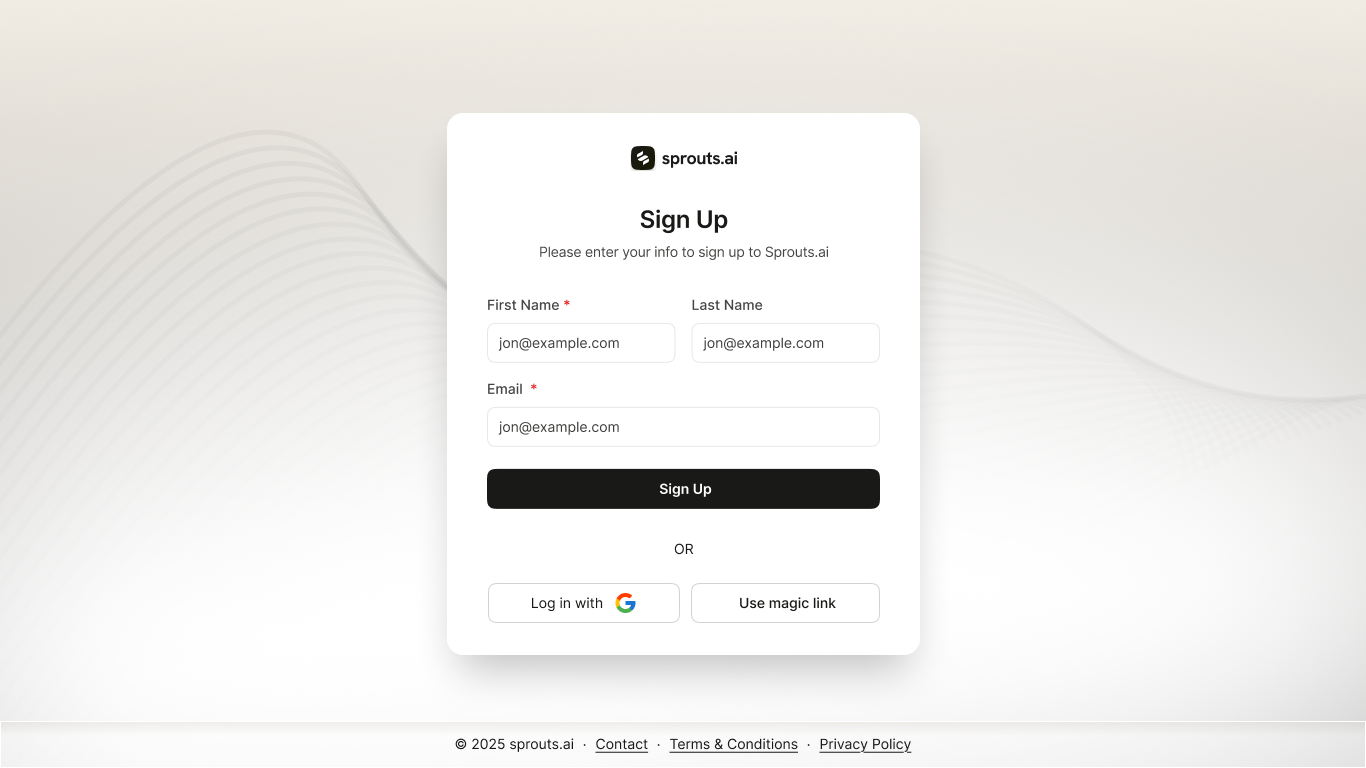
image.png

What’s working:

  • Clean, simple layout reduces cognitive load
  • Google and magic link login lowers friction

What’s not working:

  • No value proposition to explain why to sign up
  • Placeholder text is repeated and confusing

Suggestions:

  • Add a persuasive headline: "Start targeting your best-fit customers in 2 minutes."
  • Add trust microcopy: "No credit card required."
  • Distinct input labels for better form clarity

Aha moment: Not surfaced here. Could be added via a teaser like "Get 30 free leads on sign-up."

Cognitive biases:

  • Loss aversion is missing (e.g., "Don’t miss leads your competitors already found")
  • Authority bias could be activated using logos of existing customers


2. Magic Link Login
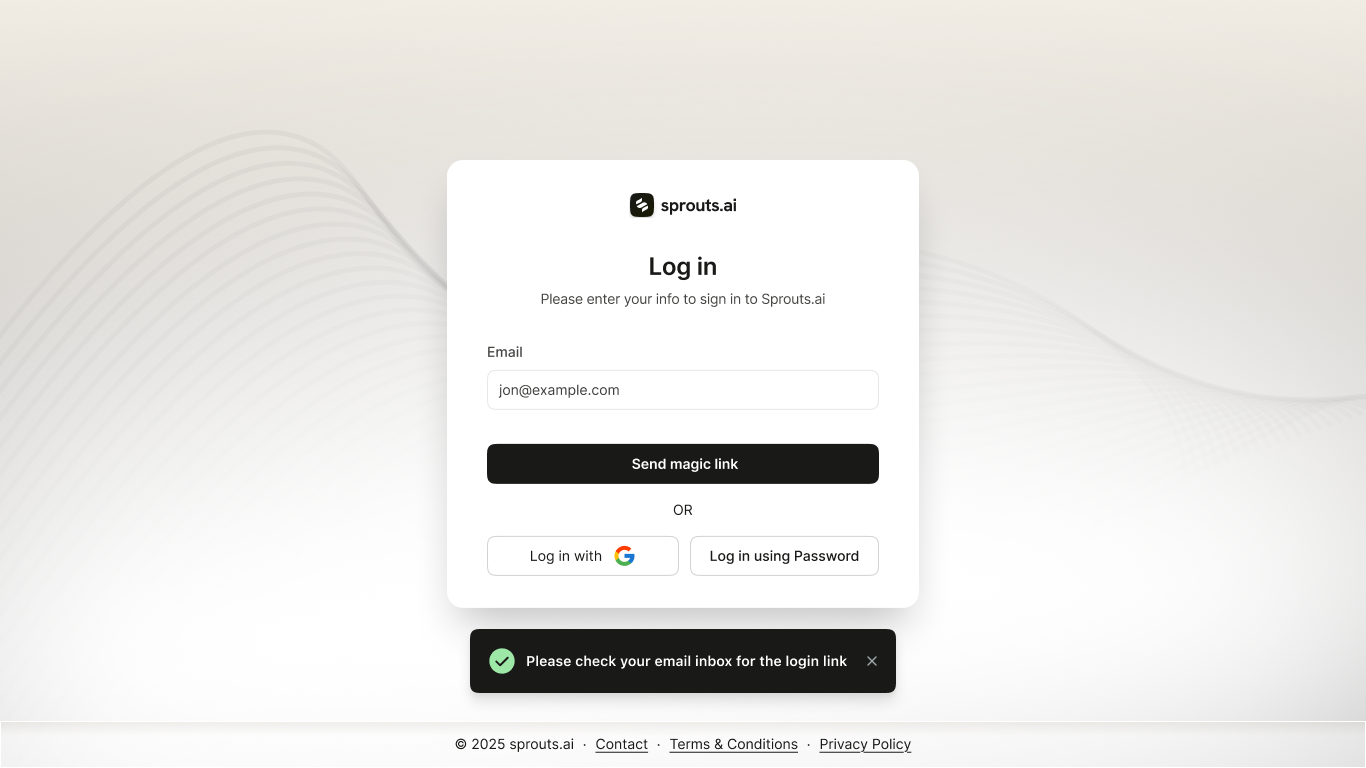
image.png

What’s working:

  • One-field login is frictionless
  • Confirmation toast gives real-time feedback

What’s not working:

  • No confirmation on what’s next
  • No fallback/resend in case of delay

Suggestions:

  • Add line: "Login link valid for 15 mins. Didn’t receive it? [Resend"]
  • Add a benefit message: "You're one step from building your ICP."

Aha moment: Still missing. Could add a stat: "Most users unlock 10+ leads in 5 mins."

Cognitive biases:

  • No use of anticipation bias (nothing builds excitement for the next screen)


3. Welcome Modal
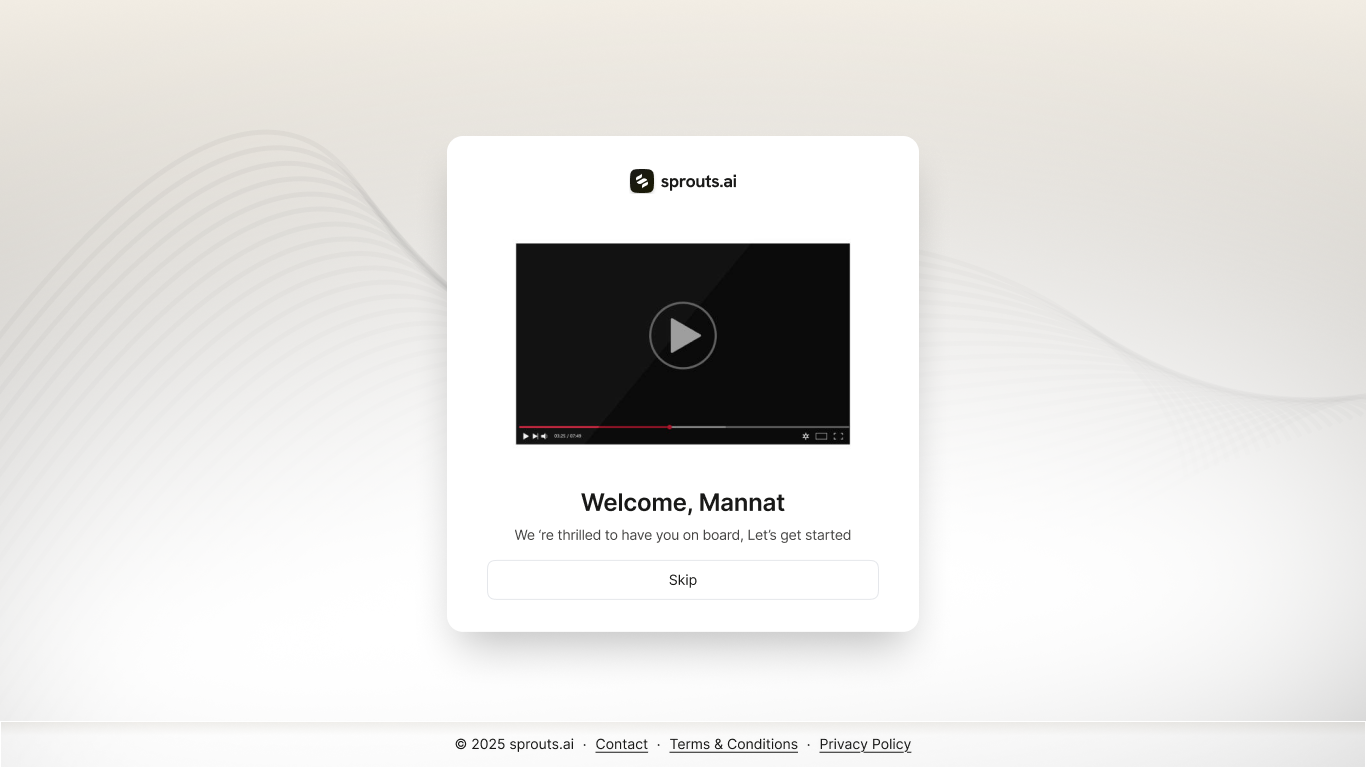
image.png

What’s working:

  • Personalized touch with name builds trust
  • Video onboarding option provides optional depth

What’s not working:

  • No summary or hook for the video
  • Thumbnail is visually empty and doesn’t excite

Suggestions:

  • Add a video title: "Create your first ICP in 60 seconds."
  • Show video duration

Aha moment: Can happen if the video visually shows ICP-to-lead output flow

Cognitive biases:

  • Could activate commitment bias if video promises results and is short


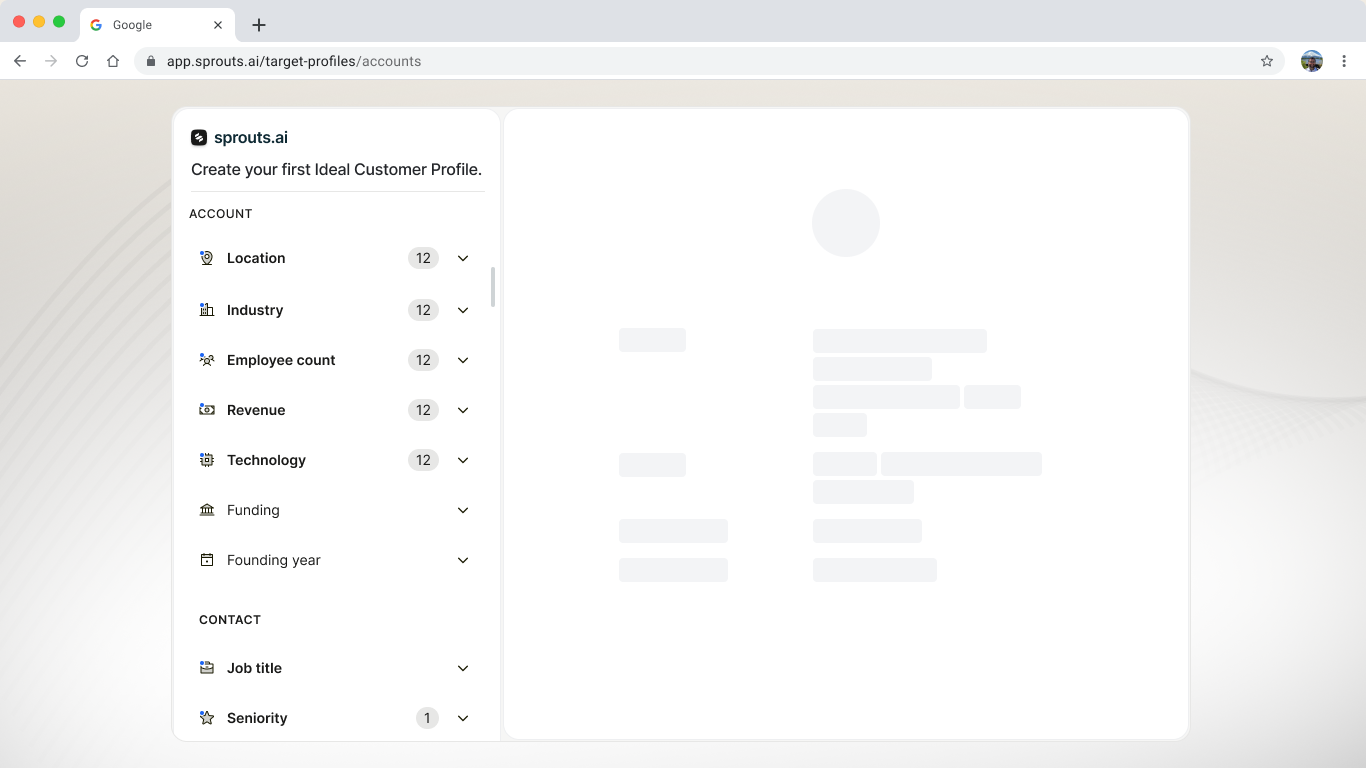
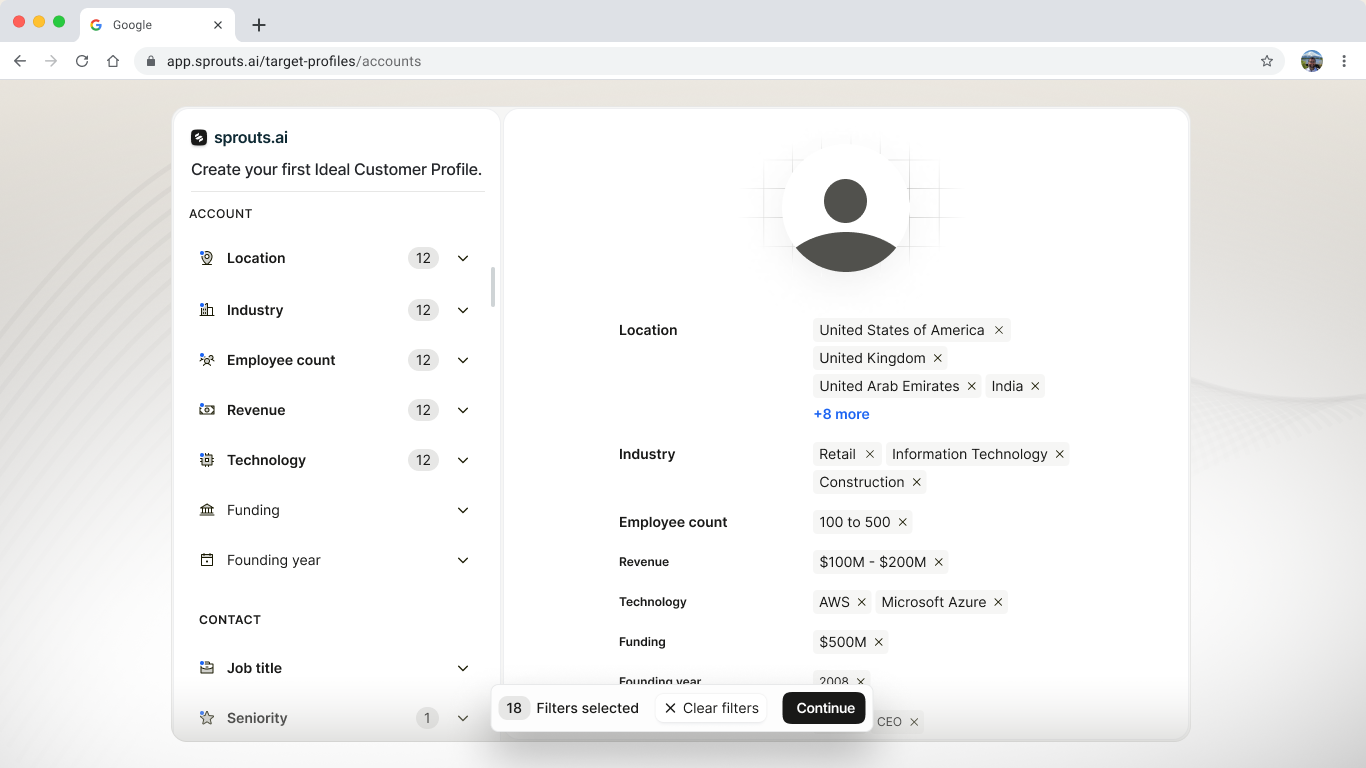
4. Create Ideal Customer Profile (ICP)
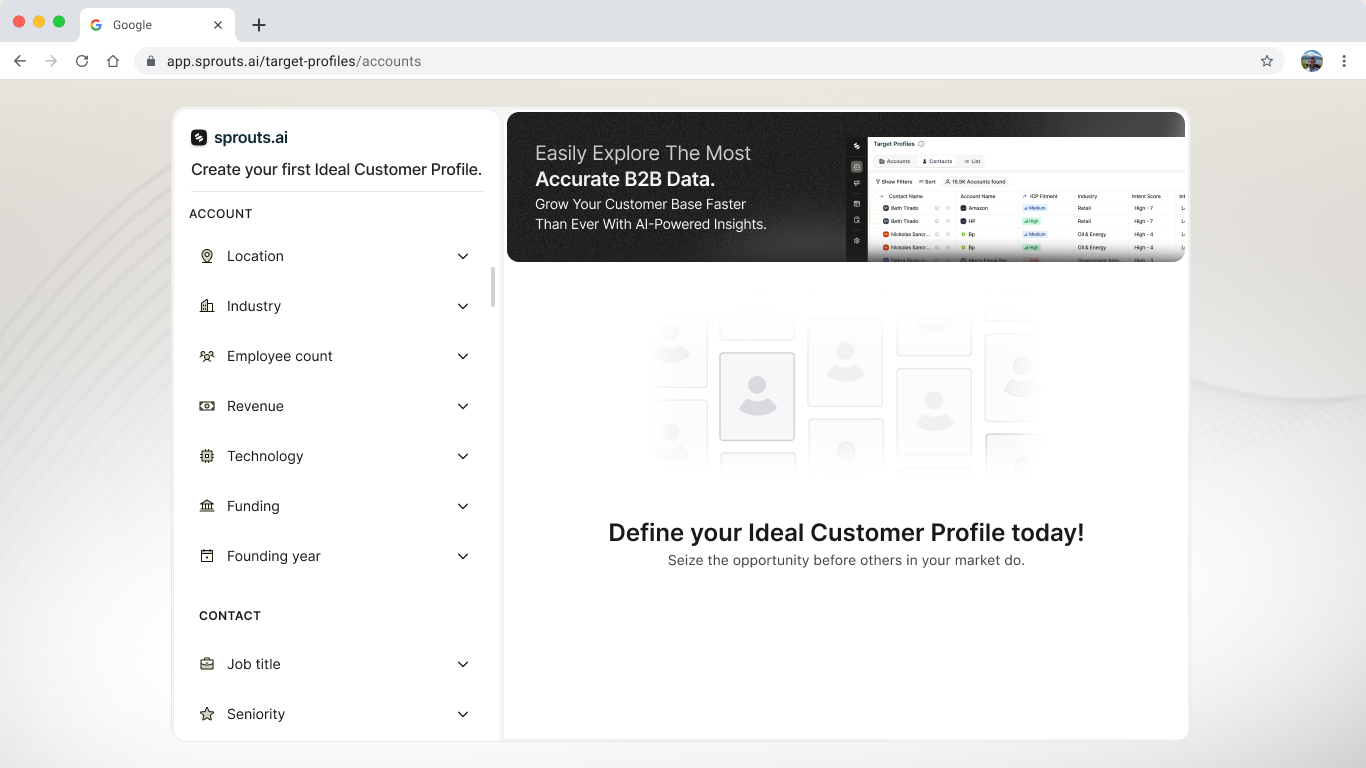
image.png

image.png

image.png

What’s working:

  • Familiar multi-filter UI for advanced targeting
  • Structured by account and contact fields

What’s not working:

  • Intimidating to new users
  • No starting point guidance or preview

Suggestions:

  • Add a pre-filled ICP example
  • Add onboarding hints: "Start with location + industry."

Aha moment: When users select filters and see count of matched companies

Cognitive biases:

  • Activates IKEA effect if user builds ICP and sees results
  • Can trigger choice overload due to too many unchecked filter options


5. ICP Confirmation and Dashboard
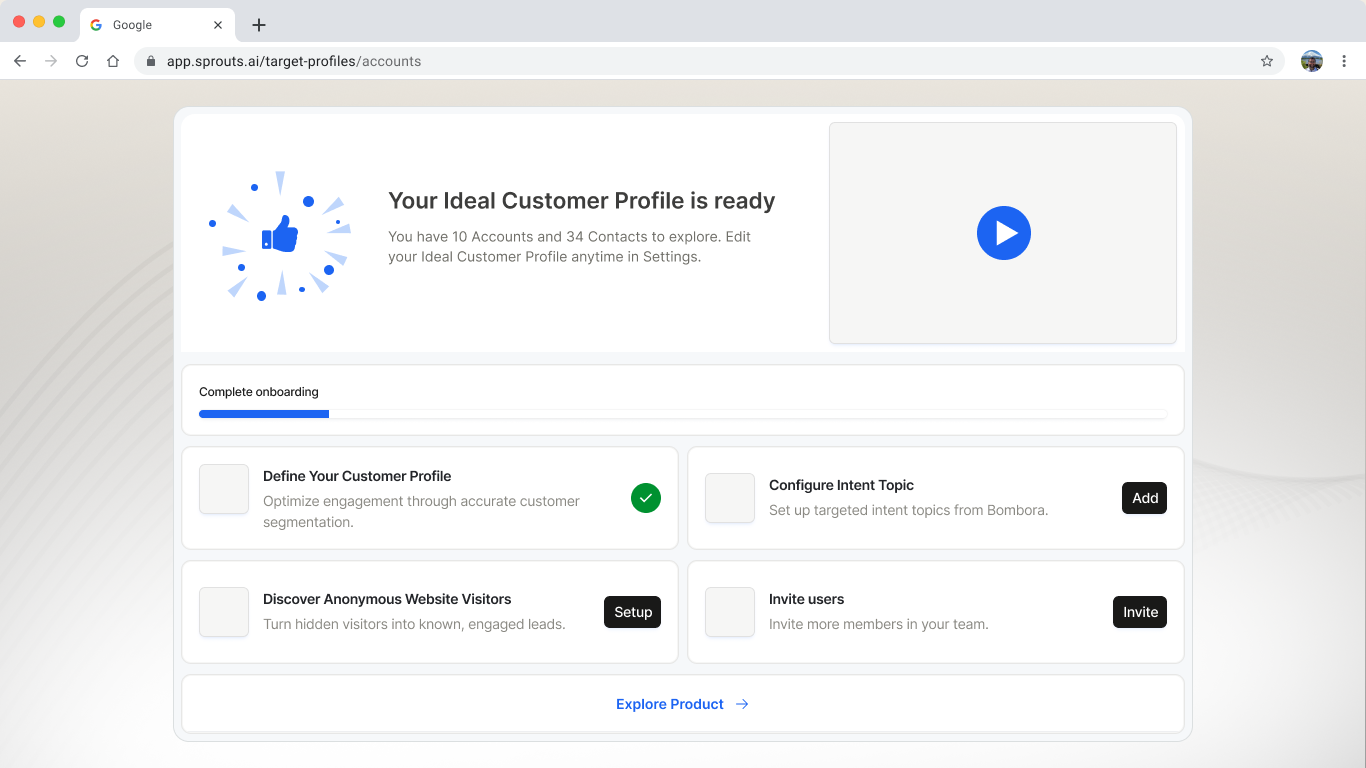
image.png

What’s working:

  • Progress bar adds momentum
  • Celebration visual adds delight
  • Action cards guide next steps

What’s not working:

  • No data feedback from ICP creation
  • No prioritization of next best action

Suggestions:

  • Add outcome stats: "You unlocked 34 contacts from 10 accounts."
  • Add badges like "Start Here" to surface priority steps

Aha moment: When the user sees contacts or leads unlocked

Cognitive biases:

  • Confetti triggers reward loop
  • Misses opportunity for social proof bias (e.g., "Top users complete setup in 4 mins")


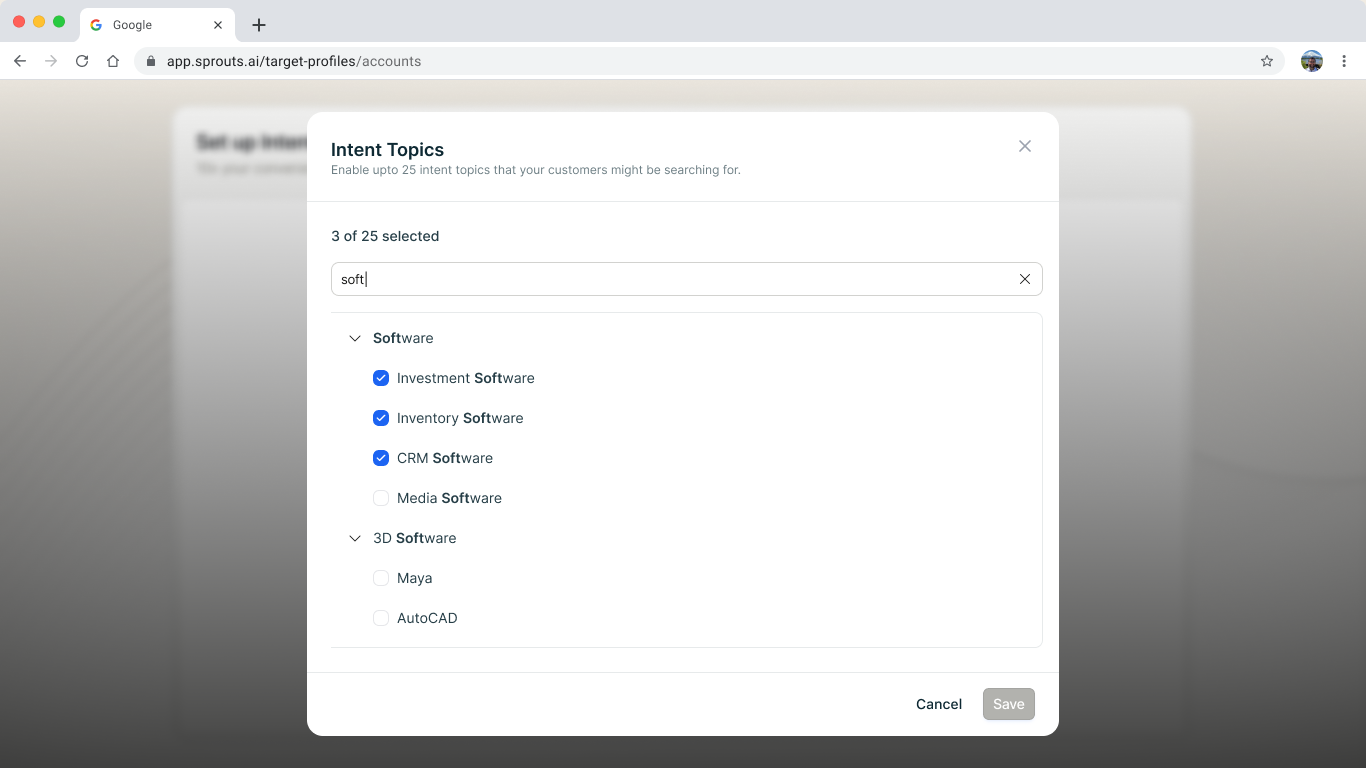
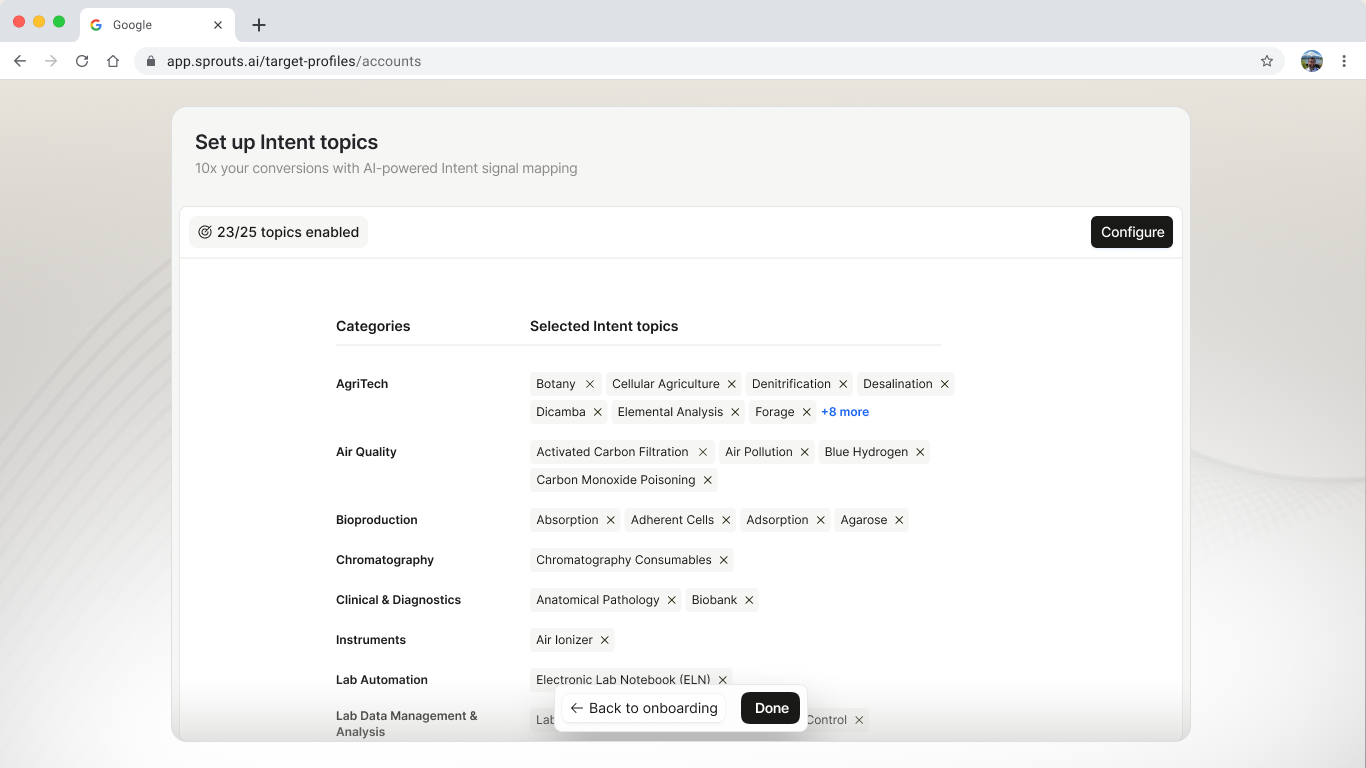
6. Intent Topics
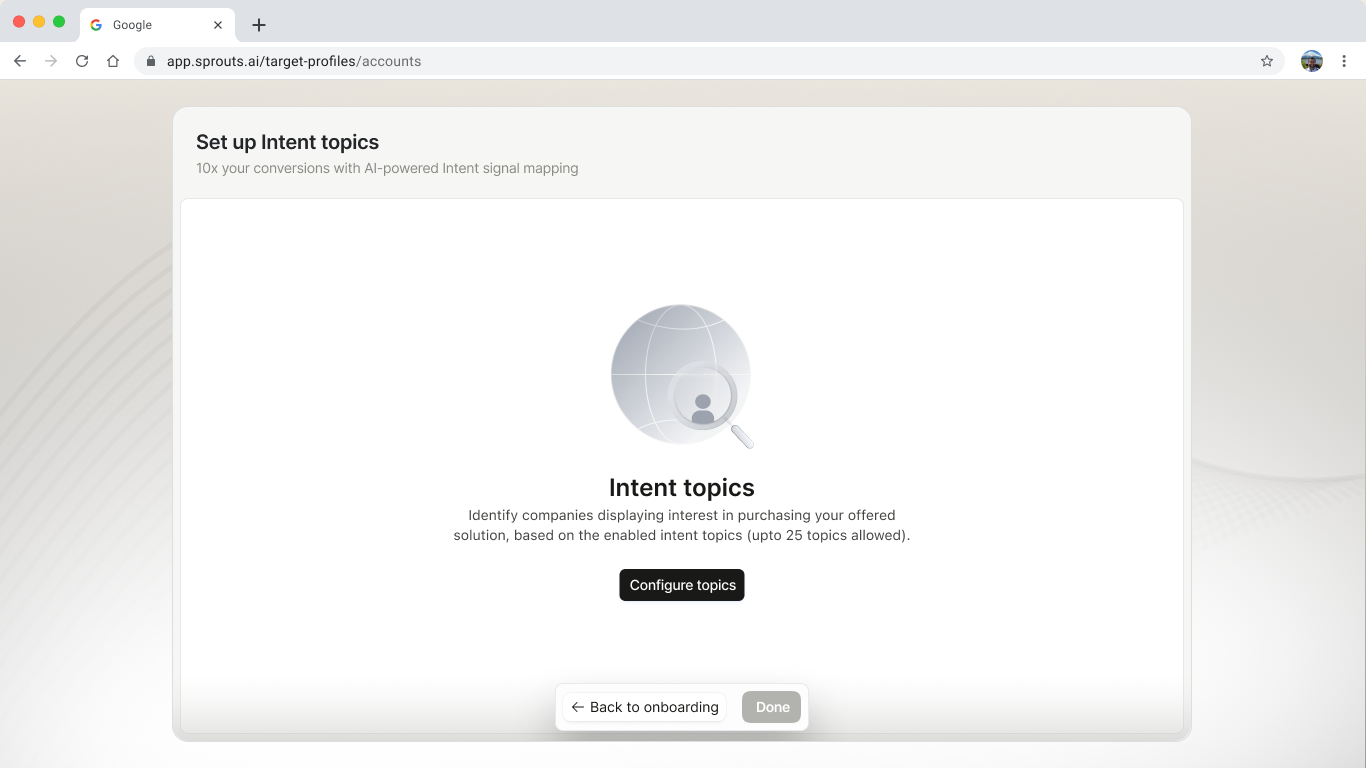
image.png

image.png

image.png

What’s working:

  • Organized by category
  • Power-user-friendly interface with bulk select and search

What’s not working:

  • Emotionally flat and lacks motivation
  • 25-topic limit not explained upfront

Suggestions:

  • Guide user with: "Pick 5 to get started—we’ll suggest more."
  • Show impact: "Selecting CRM adds 2,130 matched accounts."

Aha moment: Seeing the change in account match count as topics are selected

Cognitive biases:

  • Could use anchoring bias by suggesting most popular or high-performing topics


7. Reveal Website Visitors Setup
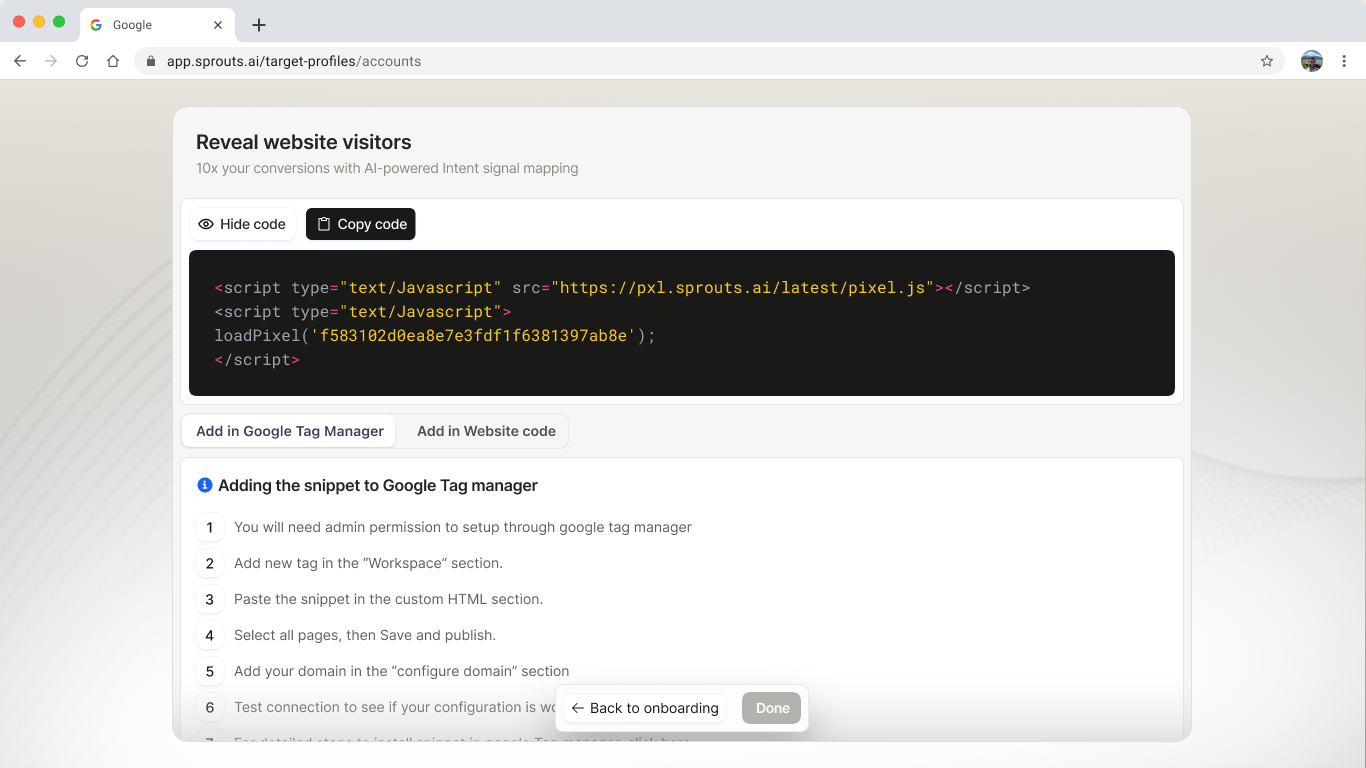
image.png

What’s working:

  • Technical flexibility with script vs. GTM
  • Shows clear installation instructions

What’s not working:

  • Overwhelming to non-technical users
  • No verification if installation works

Suggestions:

  • Add visual walkthrough or short guide video
  • Detect and confirm tracking pixel automatically

Aha moment: When visitors appear in dashboard post-setup

Cognitive biases:

  • Activates sunk cost fallacy once a user installs the pixel and continues


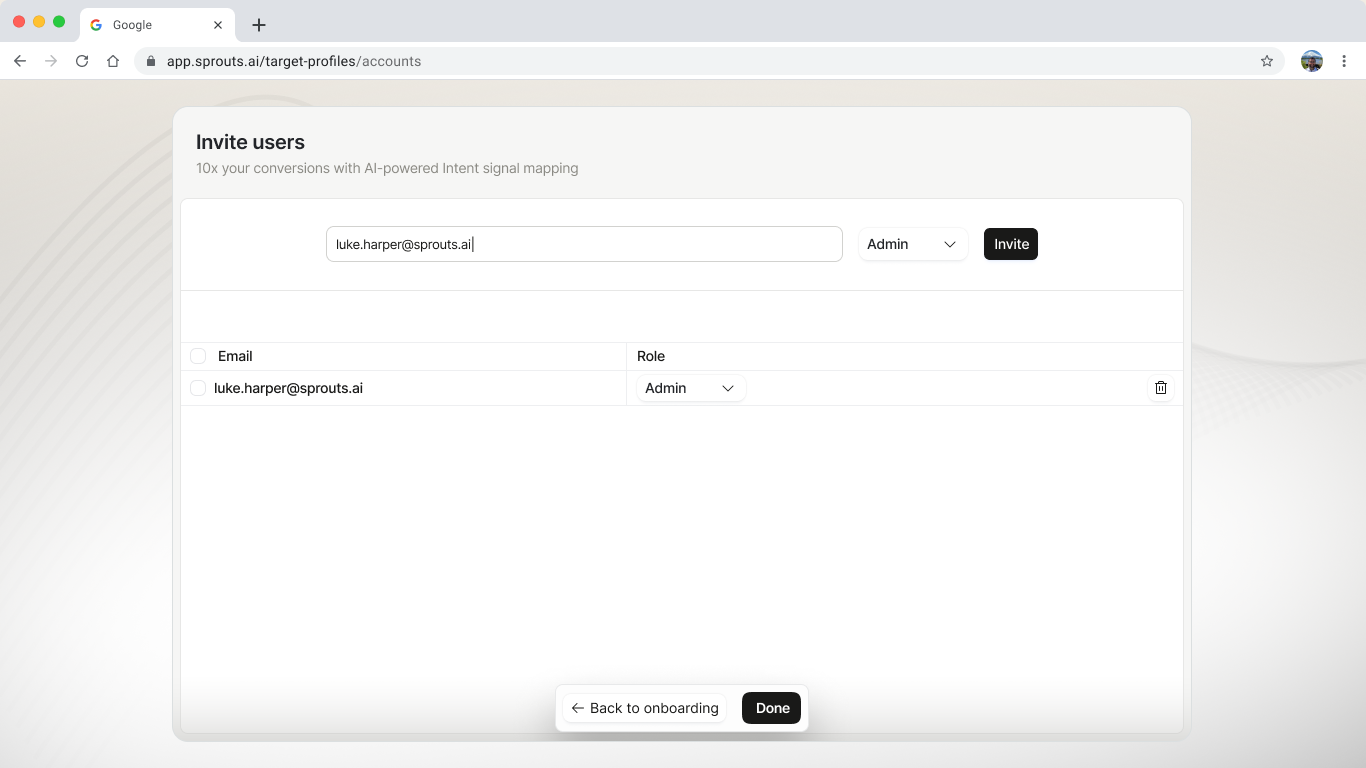
8. Invite Users
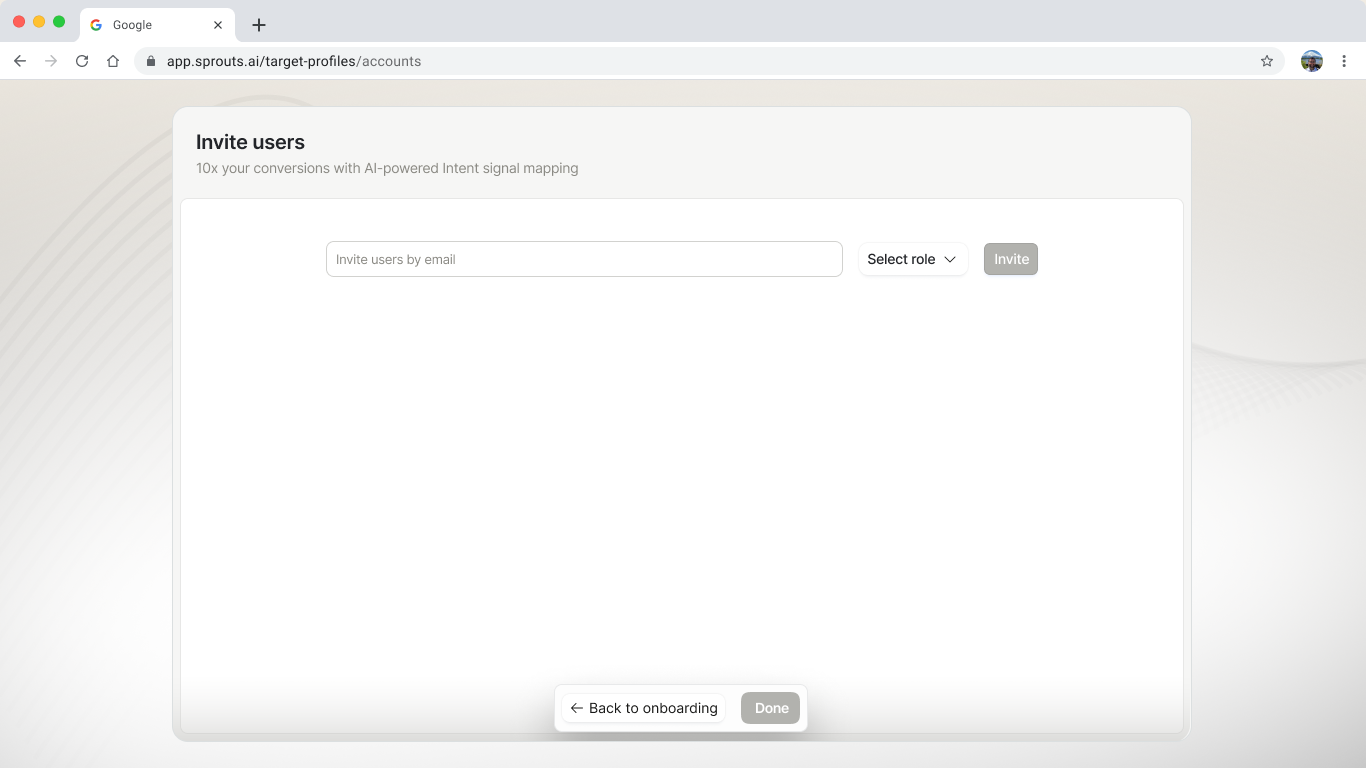
image.pngimage.png

What’s working:

  • Flexible role assignment interface
  • Encourages collaborative team use

What’s not working:

  • Doesn’t explain why inviting is helpful
  • No suggested default invites based on user role

Suggestions:

  • Add copy like: "Invite your sales team to view shared leads and ICPs."
  • Provide a quick invite for common roles (AE, SDR, Manager)

Aha moment: When invited teammates join and begin engaging with shared data

Cognitive biases:

  • Can trigger bandwagon bias if shown as a team-recommended action
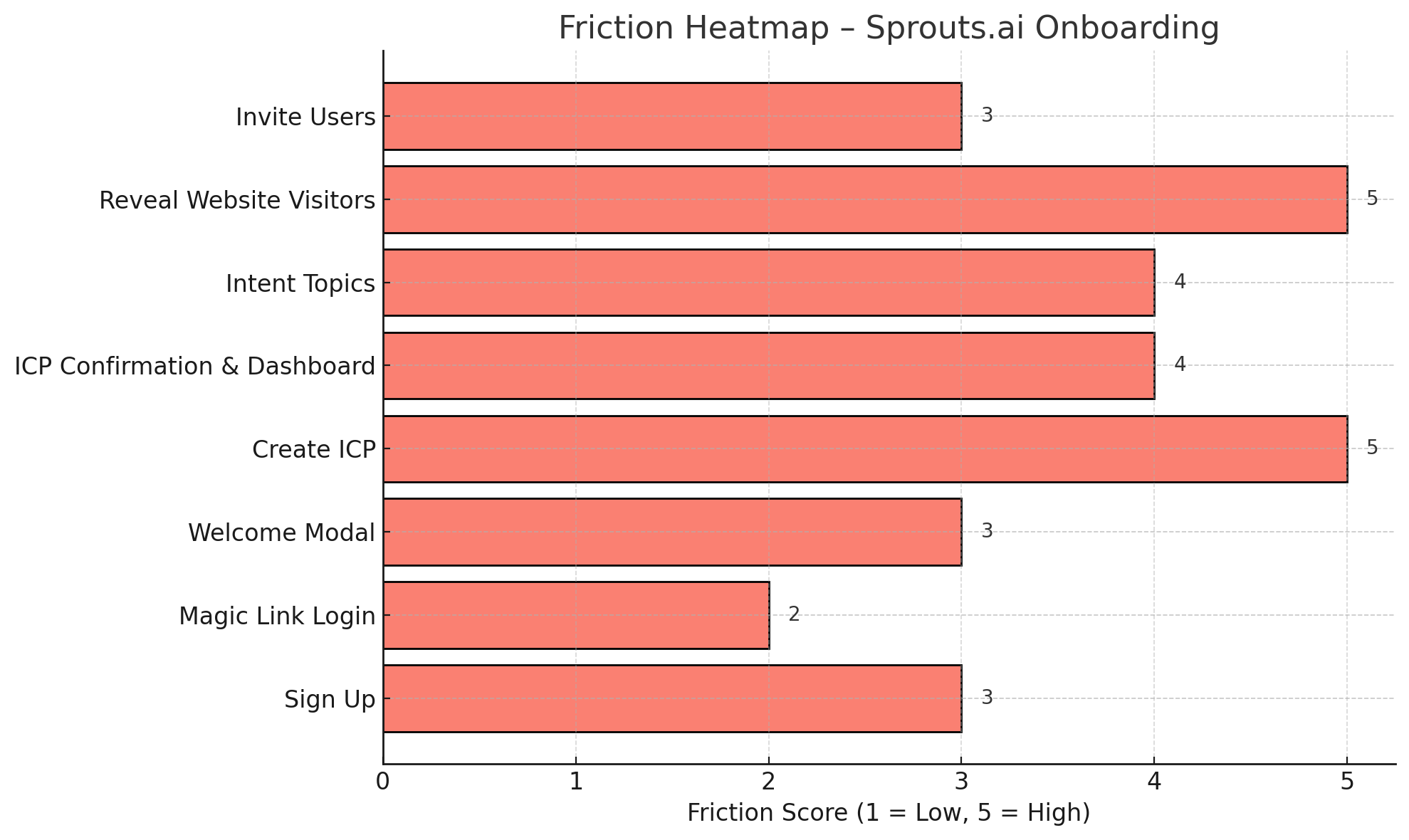


Friction Heatmap – Sprouts.ai Onboarding.png

Key Observations:

• Highest friction areas:

• “Create ICP” and “Reveal Website Visitors” — both scored 5/5 on friction

• These steps are dense, require effort, and have unclear guidance

• High friction + high potential:

• “Intent Topics” and “ICP Dashboard” score 4/5, with strong improvement upside

• Low-friction steps like “Magic Link Login” are smooth and need no change


Here’s a humanized rewrite of your message. It keeps all the original insights but makes it feel more like someone’s explaining it naturally, not just listing it out:


1. Retention Metrics (D1, D7, D30)


What it shows

How many users come back on Day 1, Day 7, and Day 30 after signing up.


Why it’s important

It tells you if users found value early on—and whether that value stuck.


How to read it

• D1 < 30% → Users didn’t get a good first impression

• D7 < 15% → They didn’t see enough value to return

• D30 < 10% → Your product isn’t a core part of their workflow


How to fix low retention

• Send follow-up emails after Day 1 with stats on ICP progress

• If their ICP is incomplete, offer a 5-minute walkthrough—automatically book it with a rep or chatbot


2. DAU/MAU Ratio


What it tracks

How many monthly users come back daily.


Target for B2B tools

15–20% or more—especially for tools built around team collaboration.


Why it matters

A strong DAU/MAU ratio means users are forming habits—like checking for new ICP matches or contact unlocks.


Ideas to improve it

• Add a “Daily Snapshot” to the dashboard: new ICP matches, trending accounts, intent scores

• Push alerts to Slack to bring users back in


3. Subscription vs Retention


What it shows

How many free users upgrade to paid—and how long they stick around afterward.


Things to watch for

• High drop-off after upgrade? Users didn’t see the value they expected.

• Churn in the first 14 days? Could be a mismatch between pricing and actual value.


How to improve

• Add a trial milestone before paywall: “You’ve used 80% of free contacts — upgrade now”

• Trigger the paywall when users succeed (like after 3 completed ICPs or lead downloads)


4. Time to Activation (TAT)


What it tracks

Time from signup to first value event—like seeing matched leads.


Goal

70%+ users should reach this in under 5 minutes.


Examples of activation milestones

• ICP is fully set up

• At least 1 intent topic is picked

• 10+ contacts revealed

• Tracking pixel installed


How to speed this up

• Pre-fill ICP templates using role or industry

• Auto-suggest intent topics based on job title

• Show a live preview of contacts during setup


5. User Cohorts


Segment by

• Source: LinkedIn, referrals, outbound, etc.

• Role: SDRs, recruiters, founders

• Use case: lead gen, hiring, ABM

• Company size


Why it matters

Different personas activate at different speeds. Recruiters may activate faster than founders.


What to track by cohort

• Average time to activation

• Retention by role

• Paid conversion rates


What to do with it

• Create onboarding flows tailored to each role

• Show relevant copy:

• For recruiters: “Start hiring matched candidates in 5 mins”

• For founders: “Find top leads for your TAM”


6. Acquisition Source Performance


What to track

Which channels bring in users who actually activate and convert.


Sources to look at

• Organic search

• LinkedIn DMs

• Cold outreach tools (Apollo, Instantly)

• Communities (GrowthX, Slack)

• Referrals


Key metrics

• Activation rate

• Time to activation

• Paid conversion rate


Example

Users from GrowthX convert 3x faster and stick longer. That’s a high-signal source worth doubling down on.


7. Product Reviews, NPS & Sentiment


What to look at

• First NPS at Day 7

• Reviews on G2 or Chrome Store

• Onboarding survey feedback


Why it matters

You’ll learn what’s working—and what’s blocking people from seeing value.


Ask users

• “What almost made you quit using Sprouts?”

• “How long did it take to find your first useful lead?”


How to use this

Take the positives and use them in landing page copy and sales decks.


8. Feature-Level Activation


Track key features that tie to retention

• % of users who complete their ICP

• % who select 5+ intent topics

• % who reveal over 20 contacts

• % who invite team members

• % who install the tracking pixel


Use a scoring model (0–100)

• 20 pts → ICP complete

• 15 pts → Intent topic added

• 15 pts → Dashboard explored

• 25 pts → Contacts revealed

• 25 pts → Pixel installed


Anyone scoring 70+ is considered “activated.”


9. Session Replays & Drop-Offs


Use tools like PostHog or FullStory to find out

• Where users hesitate or get confused

• Rage clicks

• Drop-offs

• Time spent on each screen


Then ask in-app

“What’s confusing here?” and fix it fast.


10. Aha Moment Detection


Find out when users feel real value

• Lead gen: ICP + lead list download

• Hiring: Recruiter selects job title and sees matches

• ABM: Intent topic shows 3+ high scores


What to do

Design your flow to surface that moment faster—make it impossible to miss.


Summary

What Great Activation Looks Like at Sprouts.ai

• 70% of users complete ICP + intent setup within 5 minutes

• D7 retention > 25% across all ICPs

• Recruiters activate in < 3 minutes with templated flows

• Founders take longer → offset with guided onboarding

• DAU/MAU stabilizes around 20% with alerting and dashboards

• Acquisition source attribution guides marketing spend

• Feature usage scores used to identify power users for referrals


[object Object],[object Object],[object Object],[object Object]

Brand focused courses

Great brands aren't built on clicks. They're built on trust. Craft narratives that resonate, campaigns that stand out, and brands that last.

View all courses

All courses

Master every lever of growth — from acquisition to retention, data to events. Pick a course, go deep, and apply it to your business right away.

View all courses

Courses

Built by Leaders From Amazon, CRED, Zepto, Hindustan Unilever, Flipkart, paytm & more
View All Courses
Advanced Growth Strategy
Brand Led Growth
Creative Strategy
Storytelling
Data Led Growth
Event Led Growth
Partnership Led Growth
Tech for Growth
Go to Market
Growth Model Design

Crack a new job or a promotion with ELEVATE

Designed for mid-senior & leadership roles across growth, product, marketing, strategy & business

View All Resources

Learning Resources

Browse 500+ case studies, articles & resources the learning resources that you won't find on the internet.

Patience—you’re about to be impressed.